
Learn About Syspro Dynamics 365 CE Integration for Manufacturing Companies

Article Links
- Learn About Syspro Dynamics 365 CE Integration
- What Data Is Integrated Between Syspro and Dynamics
- How Syspro Integrates with Microsoft Dynamics
- Sales and Operations Challenges
- ERP–CRM Integration as a Strategic Capability
- Implementing Syspro and Dynamics 365 CE
Intro to Syspro Dynamics 365 CE Integration
Manufacturers using Syspro ERP across industries such as industrial machinery, electronics, food and beverage, fabricated metals, automotive parts, plastics, and chemical manufacturing often rely on Microsoft Dynamics 365 Customer Engagement (CE) to manage sales, service, and customer interactions.
In many organizations, sales and service teams work entirely within Dynamics 365 CE, while pricing, inventory, production, order fulfillment, and financials remain governed by Syspro. When these systems are disconnected, departments operate with incomplete information, decisions slow down, and operational risk increases.
A well designed Syspro Dynamics 365 integration connects ERP data and workflows into the Microsoft Dynamics environment, giving users visibility across departments while preserving Syspro as the operational system of record. This alignment allows manufacturers to modernize customer engagement without compromising ERP discipline.
What Syspro Dynamics 365 CE Integration Actually Is
ERP–CRM Integration in Microsoft Based Manufacturing Environments
At its core, ERP–CRM integration connects front office customer engagement platforms with backoffice operational systems to ensure consistent, synchronized data across the organization. In practice, manufacturers most often evaluate this as Dynamics 365 CRM integration, even though Microsoft now groups these capabilities under the Customer Engagement (CE) umbrella.
In Microsoft centric manufacturing environments, this means aligning Dynamics 365 CE modules (like Sales, Customer Service, and Field Service) with Syspro managed inventory, pricing, orders, production, and financials.
Integration is not about replacing ERP functionality with CRM features. Instead, it ensures that data flows reliably between systems so each platform can focus on its intended role.
Clear Roles, Connected Systems
Successful Syspro Dynamics 365 CE integration begins with role clarity:
- ERP (Syspro) remains the system of operational truth. It’s where employees manage inventory, production, pricing, order processing, and financials.
- CRM (Microsoft Dynamics 365 CE) serves as the system of engagement within the Microsoft ecosystem. It’s where employees create personalized marketing, sales, and service experiences by using data and intelligence to improve interactions
ERP-CRM Integration does not blur these roles. Instead, it allows these systems to talk to one another and provide alignment across departments for improved service and reduced costs. This is what true integration means.
In practice, it’s about:
- CRM-ERP data synchronization to keep customers, items, pricing, and orders consistent across systems to enable a single source of truth
- Connecting ERP and CRM platforms without duplicating business logic, so rules are defined once and enforced everywhere
- Supporting business workflows that span sales, operations, and finance
True integration creates a 360° view of the customer, while allowing ERP and CRM to each do what they do best.
Learn more about our broader approach to Syspro CRM integration across platforms here:
What Data Is Integrated Between Syspro and Dynamics 365 CE
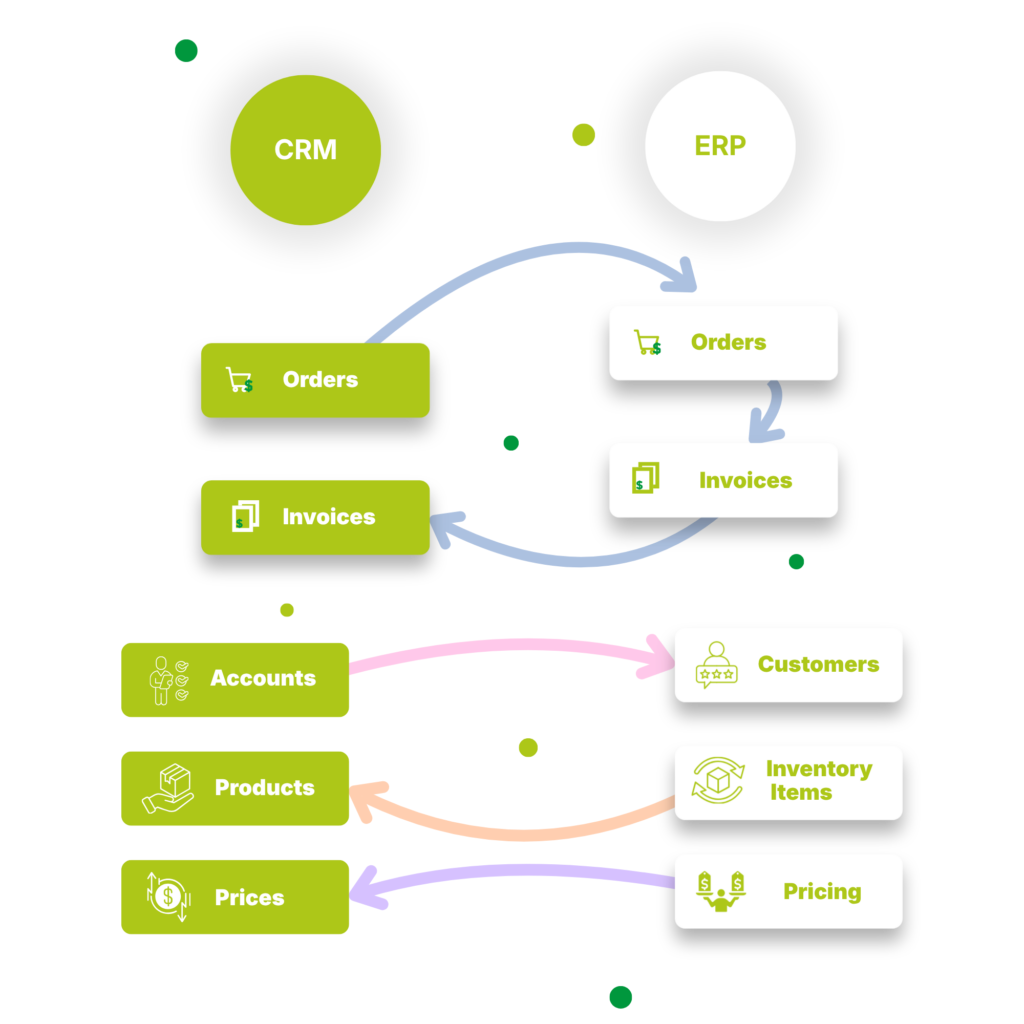
Key customer data synced between Syspro and Dynamics 365 CE
One of the primary goals of Syspro Dynamics 365 integration, and other Syspro CRM integrations for that matter, is to give CRM users access to ERP data they need without requiring direct access to Syspro.
Dynamics 365 CE users (across sales, customer service, and field service) for example, need timely, accurate information at their fingertips to respond to customers effectively.
Common data synchronized from Syspro into Dynamics 365 CE includes:
- Customer master records and account status
- Historical purchase and order activity
- ERPgoverned pricing information
- Credit limits and account holds
- Shipment and fulfillment status
This data enables CRM users to answer customer order questions in seconds. Real-time ERP sync shows exactly what’s being manufactured, in stock, picked, shipped, or backordered, with zero manual checks.
Key Operational and Financial Data Synced between Syspro and Dynamics 365 CE
A complete Syspro Dynamics 365 CE integration extends beyond contacts and accounts. Manufacturers frequently integrate operational and financial data required for quoting, servicing, and managing customers.
Typical integration areas include:
- ERP inventory visibility in Dynamics 365 CE: provides real-time ERP inventory availability in your CRM to eliminate mis-quotas, prevent stockouts, and speed up the sales process for improved quoting.
- ERP sales order data in Dynamics 365 CE, providing downstream visibility into fulfillment
- ERP product, pricing, and configuration data, ensuring CRM activity aligns with ERP rules
This ensures Dynamics 365 CE functions as a trusted engagement platform without becoming a shadow ERP.
Synchronizing Dynamics 365 CE Data Back to Syspro
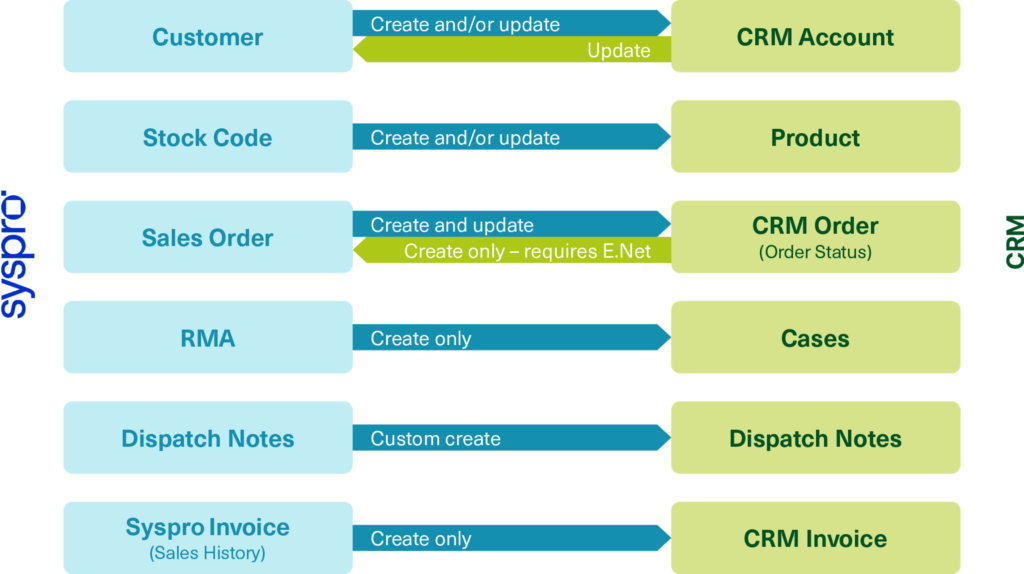
In Microsoftbased environments, integration is often bidirectional to prevent manual handoffs downstream. With what we’ve talked about so far, all these integrations are related to making Syspro data accessible Dynamics 365 CE, but what about making Dynamics 365 CE data available in Syspro? And what popular use cases can exist?
Common use cases include:
- Dynamics 365 CE quotes or opportunities converting into Syspro sales orders
- Prospects created or updated in Dynamics 365 CE synchronizing to Syspro customers
- Customer service cases generating RMAs or service orders in Syspro
- Quote/CPQ/Order details flowing from Dynamics 365 CE into ERP structures such as stock codes or bills of material
These flows reduce duplicate entry, improve order accuracy, and ensure ERP processes are executed from validated data.
How Syspro Integrates with Microsoft Dynamics 365 CE
A modern Syspro Dynamics 365 CE integration uses standards based, Microsoft aligned connectivity rather than spreadsheets, custom scripts, or manual imports.
Dynamics 365 CE’s structured data model and API framework support ERP integrations when paired with a Syspro aware integration architecture.
From a technical perspective, this typically includes:
- Clearly defined system boundaries and data ownership
- API based data exchange aligned with Dynamics 365 CE entities
- Bidirectional ERP–CRM synchronization
- Secure data integration aligned with IT governance standards
This approach allows Dynamics 365 CE users to work with ERP accurate data without compromising Syspro’s control and reliability.
Solving Manufacturing Sales and Operations Challenges
Bridging the Gap Between Microsoft CRM and ERP
When ERP and CRM systems are disconnected, manufacturing organizations experience friction across departments. Sales teams operate in Dynamics 365 without insight into inventory or production constraints, while operations teams react to demand without clear visibility into CRM activity.
A properly designed Syspro Dynamics 365 CE integration helps manufacturers:
- Convert CRM activity into validated ERP transactions
- Provide realtime ERP visibility to Dynamics 365 CE users
- Eliminate manual rekeying between systems
- Reduce inconsistencies and reconciliation errors
- Improve collaboration between sales, service, operations, and finance
With Syspro data accessible inside the Microsoft CRM environment, staff stop relying on outdated reports, and get real, up-to-date revenue data from Syspro so that teams always know where the numbers really stand. This alignment shortens quote-to-order cycles, increases forecast accuracy, and improves cross functional trust.
Designed for Syspro Manufacturing Environments
Syspro manufacturing environments introduce complexity that generic ERP–CRM integrations often overlook. Manufacturing and distribution data, production constraints, and operational dependencies must be made visible to CRM users without weakening ERP governance.
In a Microsoft-centric environment, a Syspro aware Dynamics 365 CRM integration focuses on how ERP data is presented and used within Microsoft-based sales and service workflows, rather than duplicating ERP logic.
In practice, this means:
- Making both manufacturing and distribution data visible inside Dynamics 365 CE in a way that supports selling and servicing to customers without exposing unnecessary ERP complexity
- Providing Role specific ERP visibility in Dynamics 365 CE, so Business Application users see only data relevant to their responsibilities.
- Designing Dynamics 365 CE experiences around how manufacturing users actually work today, supporting adoption without forcing ERP behavior into CRM
- Enabling production aware CRM workflows in Dynamics 365 CE, where users can understand capacity, lead-time, and material constraints before committing to customers
- Improving alignment between Dynamics 365 CE users and Syspro users by ensuring both teams rely on the same ERPgoverned data
This approach allows Dynamics 365 CE to function as an effective system of engagement while Syspro remains the system of operational record.
ERP–CRM Integration as a Strategic Capability
While this article focuses specifically on Syspro Dynamics 365 CE integration, the underlying principles apply broadly across ERP–CRM integration initiatives.
Manufacturers increasingly treat ERP–CRM integration as a strategic capability. One that supports growth, improves forecast accuracy, and enables better customer experiences.
This broader category includes integrations such as:
- Syspro Salesforce integration
- Syspro SugarCRM integration
- Syspro HubSpot integration
Implementing Syspro and Dynamics 365 CE Integration
Implementing a successful ERP–CRM integration requires more than technical connectivity. It demands an understanding of manufacturing workflows, ERP data ownership, CRM adoption, and organizational change.
When executed correctly, a Syspro Dynamics 365 CE integration aligns systems, improves decision making, and supports scalable growth: without compromising ERP governance.
For manufacturers operating in Microsoft centric environments, the question is no longer whether Syspro and Dynamics 365 CE should be integrated, but how to design an integration that supports both operational control and modern customer engagement.